
HRMS Health Check and Rescue
An HRMS health check is a structured review of a system you already own: how it is configured, how clean its data is, whether people use it, how it connects to other tools and whether its reports can be trusted. HRBS finds what is wrong, ranks the fixes, and helps you carry them out on any platform.

What HRMS Health Check and Rescue includes
Six areas, each with a clear output.
The scope on one page
Signs you need this
If several of these sound familiar, this service is worth a conversation.
- HR still keeps a spreadsheet next to the HRMS, just in case.
- Managers approve leave by email and someone re-enters it later.
- Payroll needs manual corrections every month.
- Headcount in the HRMS does not match finance.
- You pay for modules nobody has switched on.
- Vendor tickets stay open for weeks without an owner.
Questions to ask any provider
Use these to judge HRBS or anyone else. A good provider answers each one plainly before work starts.
- Will you review the configuration itself, or only interview users?
- How will you separate set-up problems from product limits?
- Which fixes can our team make, and which need the vendor?
- How do you check that data clean-up did not break payroll?
- What happens if the answer is to replace the platform?
Common mistakes when an HRMS is not working
Four patterns we see often. Each is cheap to avoid and costly to fix later.
Who it suits
It suits employers who bought an HRMS one to three years ago and still run HR from spreadsheets, who are paying for modules nobody uses, or who are about to switch vendors and want to know whether the tool or the set-up is the problem. It works on Keka, ZingHR, Adrenalin HCM, Odoo and other platforms.
What you receive
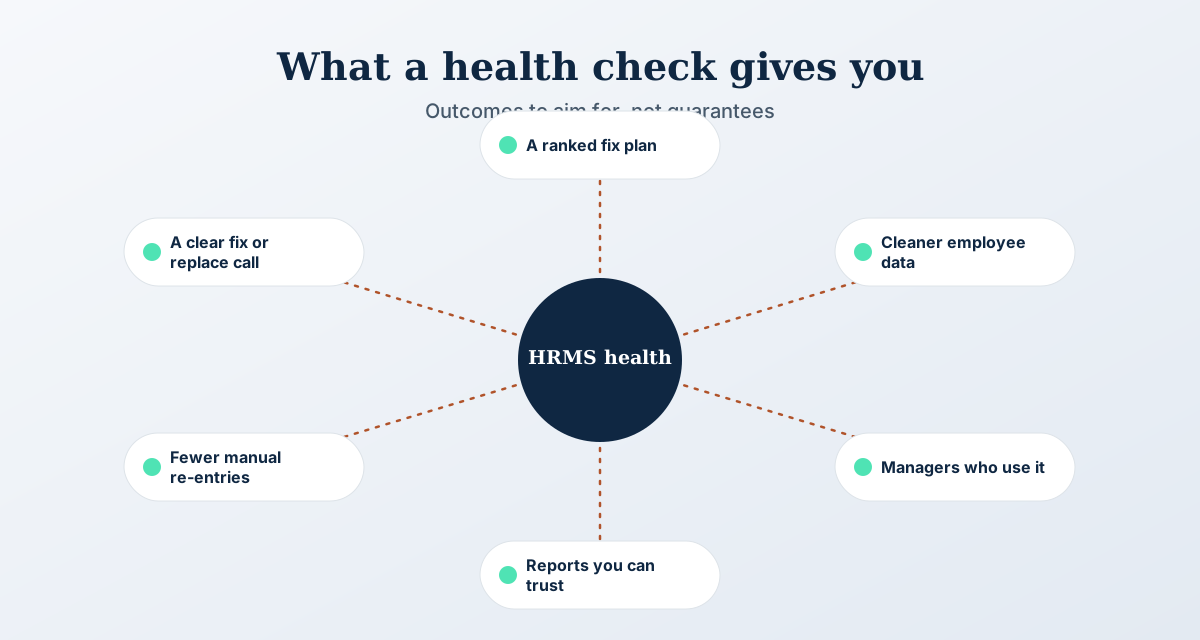
- A ranked list of issues, each with a cause, an owner and an effort estimate
- Quick wins you can finish within weeks, separated from larger fixes
- A clean-up plan for employee data with before and after counts
- A retraining plan for managers and HR users
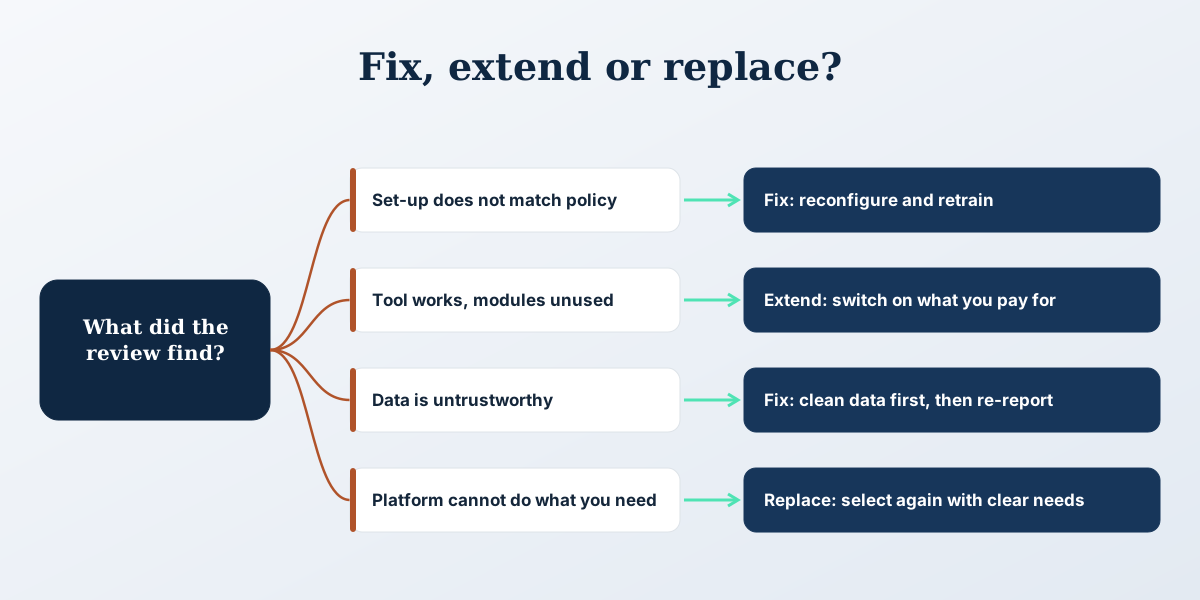
- A recommendation: fix, extend or replace, with reasons
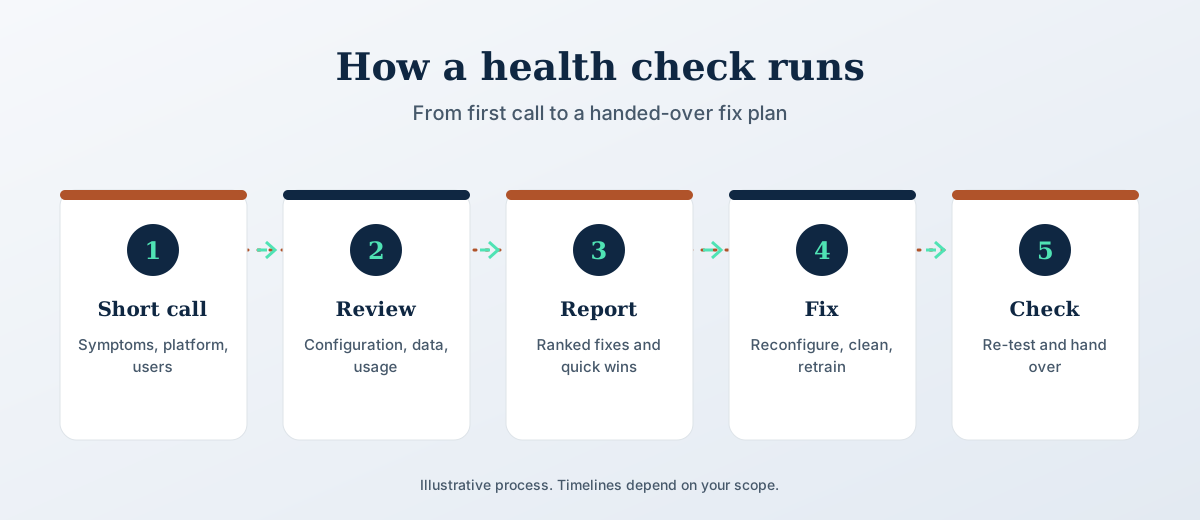
How HRMS Health Check and Rescue works
Five steps. The scope and timeline are agreed in writing before work starts.
The process in pictures
Three views of how this works: the steps, how to choose, and what to aim for.
Why it matters
A system that disappoints is rarely a bad product. More often the original set-up copied an old spreadsheet, data was loaded without cleaning, or nobody trained the managers who approve leave and expenses. Replacing the platform repeats the same mistakes on a new screen. A health check separates what the tool cannot do from what the set-up got wrong, so you spend on the right fix. Sometimes that fix is a day of reconfiguration, and sometimes it is a change of vendor.
What we need from you
- Admin access or a read-only export of employee, leave and payroll data
- Your current policies for leave, attendance and approvals
- A list of the reports HR and finance use each month
- Names of the vendor contacts and open tickets
Not included
- Software licences or vendor fees, which stay with the vendor
- Legal opinions on contracts with your vendor
- A guarantee that a poor-fit platform can be made to work
HRMS Health Check and Rescue FAQs
What is an HRMS health check?
It is a review of an HRMS you already use. HRBS checks configuration, data quality, adoption, integrations, reports and vendor support, then gives you a ranked fix plan with owners and effort estimates.
How is it different from a new implementation?
An implementation sets up a system from scratch. A health check starts from what is already live, finds what is broken or unused, and fixes that. It is usually smaller, faster and cheaper than starting over.
Do you work on platforms other than Keka, ZingHR, Adrenalin HCM and Odoo?
Yes. The review method is platform neutral. For platforms HRBS does not implement itself, the report separates the fixes you can make from those the vendor must make.
Will you recommend replacing our HRMS?
Only if the review shows the platform cannot meet your needs. The report states the reasons, so you can judge them. Many cases end in reconfiguration and retraining.
How long does a health check take?
It depends on the size of the system and the access you give. The scope and timeline are agreed in writing after a short call, which is where the free HR review starts.
What do you need from us?
Access to the system or an export, your policies, the monthly reports you rely on and the vendor contacts. A named HR owner who can answer questions during the review helps most.
How often should we run an HRMS health check?
Once a year suits most employers, and again after a large change such as a new plant, an acquisition or a new payroll rule. A short check six months after go-live catches set-up problems early.
Can a health check fix payroll errors?
It finds where payroll errors start, which is usually in salary structures, attendance links or leave rules. HRBS then fixes the configuration with your team and checks the next payroll run against the previous one.
Will our employees notice the review?
Only a few will. HRBS speaks to a sample of managers and employees about how they use the system. Most of the work happens on configuration and data.
Talk to HRBS about HRMS Health Check and Rescue
Book a free HR review. It is a short call, and we tell you what to do first.
Book an HR review