
Odoo HR implementation that fits how you actually run HR
Odoo HR implementation means setting up the Odoo apps for employees, recruitment, time off, attendance, appraisals and expenses so they follow your policies, then loading clean data and training the people who use them. HRBS implements Odoo HR for Indian employers and charges no HRBS fee for selection and implementation. Odoo licence, hosting, integration and hardware costs stay with those providers.
Odoo is modular. You can start with a few HR apps and add more later, and it shares one database with sales, inventory and accounting if you use those too. That flexibility is useful, but it also means a lot of choices at set-up. Without a plan, companies switch on apps with default settings, load old spreadsheets as they are and find that leave rules or approvals do not match what managers actually do. A good Odoo HR implementation makes those choices on purpose.
What Odoo HR Implementation includes
Six parts, each with a clear output.
The scope on one page
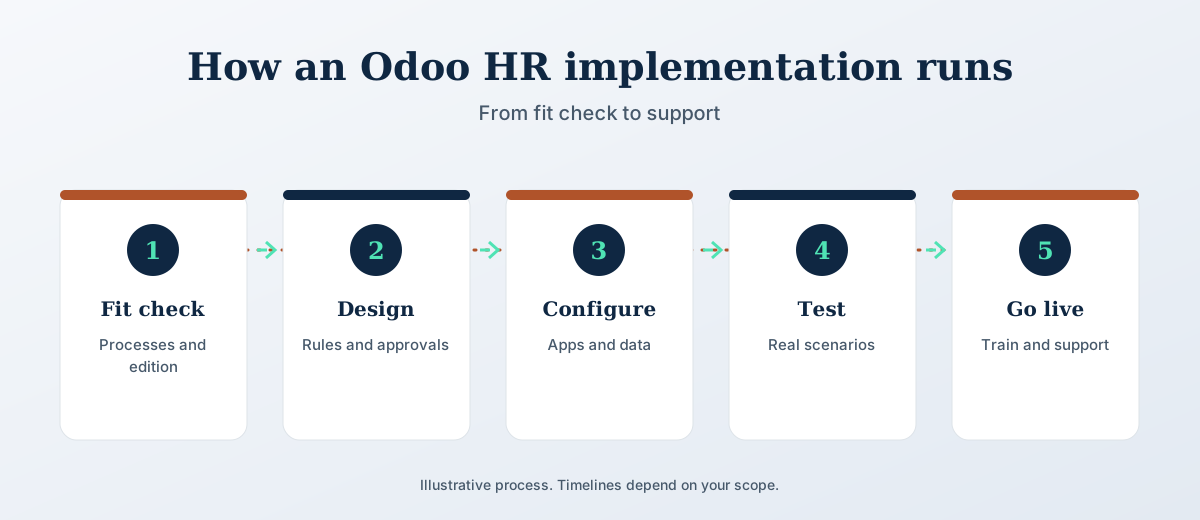
How it runs
Five stages. The scope and timeline are agreed in writing before work starts.
Community or Enterprise?
Odoo comes in two editions. Community is open source and free to use. Enterprise is licensed per user and includes more apps and features, and some HR apps are only available there. Which one suits you depends on the apps you need, your user count and whether you want Odoo to host the system. HRBS confirms the app list for your edition during the fit check, before you commit to a licence.
What is included, and what is not
Included at no HRBS fee
- Fit check and edition advice
- Configuration of the HR apps in scope
- Data clean-up and loading
- Testing with your real scenarios
- Training for HR, managers and employees
- Support after go-live for as long as you use Odoo
Paid to other providers
- Odoo licence fees, if you choose Enterprise
- Hosting, if not on Odoo’s own cloud
- Third-party integrations and custom development
- Biometric devices and other hardware
- Statutory fees and filings
HRBS support covers HRBS’s own work. Product support for Odoo itself comes from Odoo or your licence provider.
Getting your data ready
Most delays in an Odoo rollout come from data, not configuration. Employee records kept in several spreadsheets rarely agree on names, joining dates, managers or leave balances. HRBS cleans this before loading: one record per person, one reporting line, opening leave balances signed off by HR, and documents matched to the right employee. You check a sample before anything goes live, so the first payslip and the first leave request use numbers people recognise.
Training that sticks
Training is planned by role. HR administrators learn set-up and reports, managers learn approvals on the phone app, and employees learn to apply for leave and check attendance. Short guides in plain language stay with your team after go-live. Most adoption problems come from managers who were never shown their part, so they get the most attention.
Who it suits
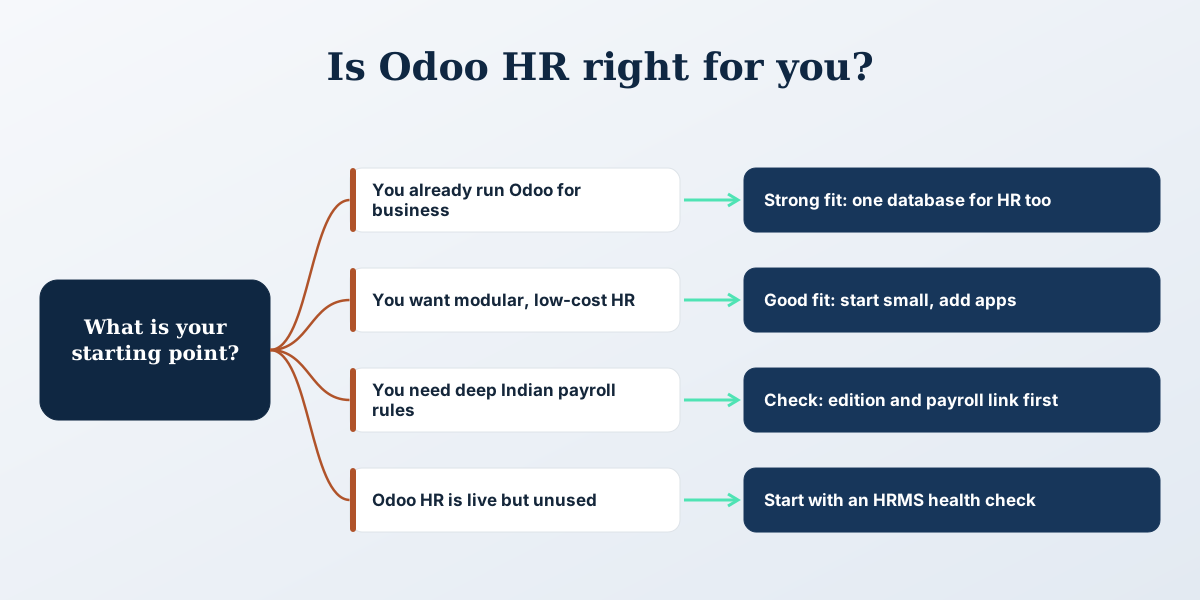
It suits growing companies that already use Odoo for sales, inventory or accounting and want HR in the same system, and companies choosing an affordable, modular HRMS. It also suits teams whose Odoo HR apps are live but not used properly; in that case the HRMS health check is often the better first step.
The first payroll cycles after go-live
HRBS stays close during the first payroll cycles. For a sample of employees, Odoo’s results are compared line by line with the last legacy or manual run, and every difference is explained before salaries are released. Manager approvals are watched for bottlenecks, and access rights are checked so people see only what they should.
Small configuration changes are expected in this period and are made without starting a new project. Once two or three cycles run cleanly, support moves to a steady routine: a named contact, help when a rule or policy changes, and advice when you want to add a module.
If you also run accounting, inventory or manufacturing in Odoo, HRBS checks how HR data reaches those modules, for example the cost centre on each payslip, so the finance team and the HR team look at the same numbers.
The process in pictures
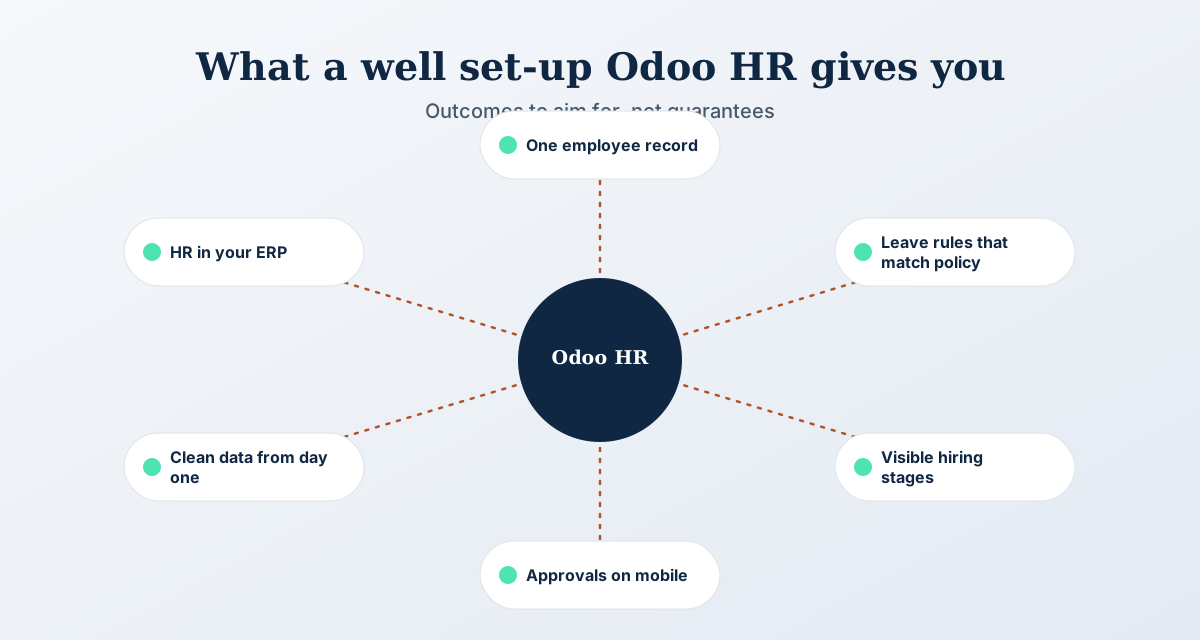
Three views of how this works: the steps, how to choose, and what to aim for.
Start with a free HR review
A short call about your situation. We tell you what to do first, and you decide whether to work with HRBS.
Book a free HR reviewOdoo HR Implementation FAQs
Does HRBS implement Odoo HR?
Yes. HRBS implements the Odoo HR apps, including employees, recruitment, time off, attendance, appraisals and expenses, and sets up payroll or a payroll link depending on your edition. There is no HRBS fee for selection and implementation.
What does Odoo HR implementation cost?
HRBS charges no fee for selection and implementation. You pay Odoo licence fees if you choose Enterprise, plus any hosting, third-party integration, hardware and statutory costs. These are quoted by the providers, and HRBS helps you compare them.
Can Odoo handle Indian payroll?
Payroll support depends on the Odoo edition and version you use. HRBS checks this during the fit check. Where Odoo payroll is not the right choice, we link Odoo to the payroll you already run so attendance and leave flow across without re-entry.
How long does an Odoo HR implementation take?
It depends on the number of apps, employees and locations, and on how clean your data is. The timeline is agreed in writing after the fit check, with a dated plan for configuration, testing, training and go-live.
Is HRBS an official Odoo partner?
HRBS implements Odoo HR as an independent HR consultancy and does not claim a partner title. Licences are bought directly from Odoo or a licence provider of your choice, and HRBS works with them on your behalf.
Talk to HRBS about Odoo HR
Book a free HR review. It is a short call, and we tell you what to do first.
Book a free HR review