
Managed HR Operations and Virtual HR Desk
Managed HR operations means HRBS runs the routine work of HR for you. The virtual HR desk is the shared team that does it: onboarding, employee records, letters, payroll inputs, employee queries and exits, to service levels agreed in writing. You keep every decision on pay, hiring and discipline.

What Managed HR Operations and Virtual HR Desk includes
Six areas, each with a clear output.
The scope on one page

Signs you need this
If several of these sound familiar, this service is worth a conversation.
- Your HR person spends most of the week on letters and data entry.
- Employees wait days for answers to simple questions.
- Joining paperwork is incomplete for some employees.
- Exits leave loose ends in payroll and access.
- Each location handles routine requests differently.
- You cannot say how many HR requests arrive each month.
Questions to ask any provider
Use these to judge HRBS or anyone else. A good provider answers each one plainly before work starts.
- Which tasks will the desk own, and which stay with us?
- What response and completion times will you commit to in writing?
- How do employees reach the desk, and who answers?
- How will you report volumes and missed targets?
- How is our employee data protected and who can see it?
Common mistakes when outsourcing HR operations
Four patterns we see often. Each is cheap to avoid and costly to fix later.

Who it suits
It suits companies where HR is one or two people who spend most of the week on administration, growing businesses that have not yet hired an HR team, and multi-location employers who want records and replies handled the same way everywhere.
What you receive
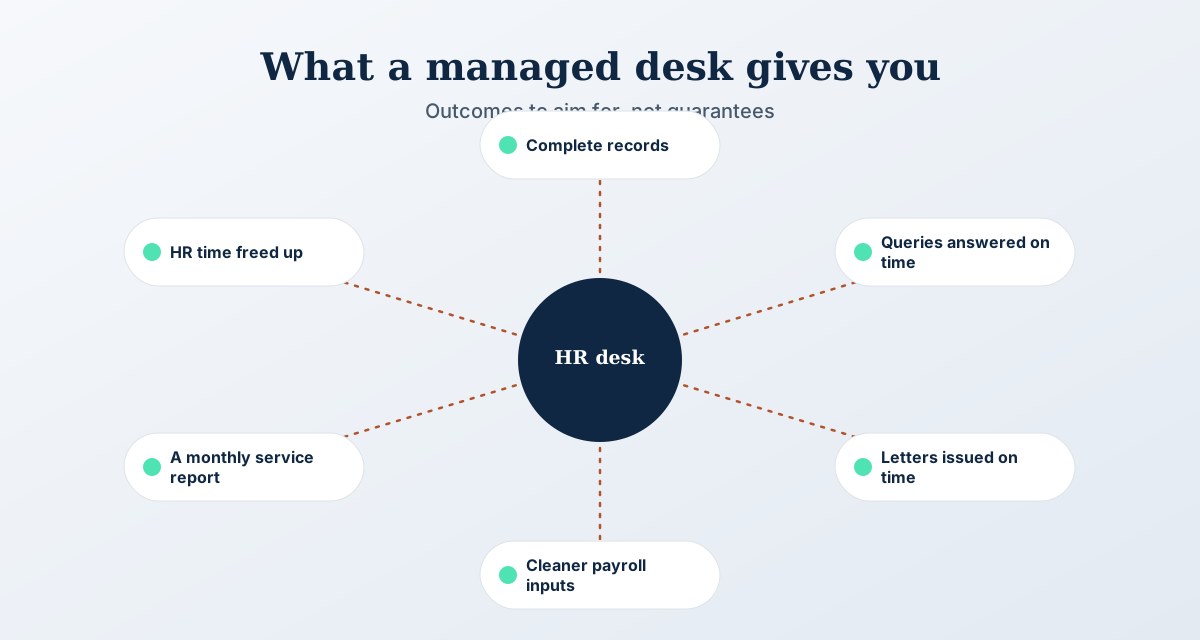
- A written list of tasks the desk handles and tasks it does not
- Response and completion times for each type of request
- A monthly report of volumes, times met and recurring issues
- Records you can open at any time for an audit or a query
- A named HRBS lead who answers for the desk
How Managed HR Operations and Virtual HR Desk works
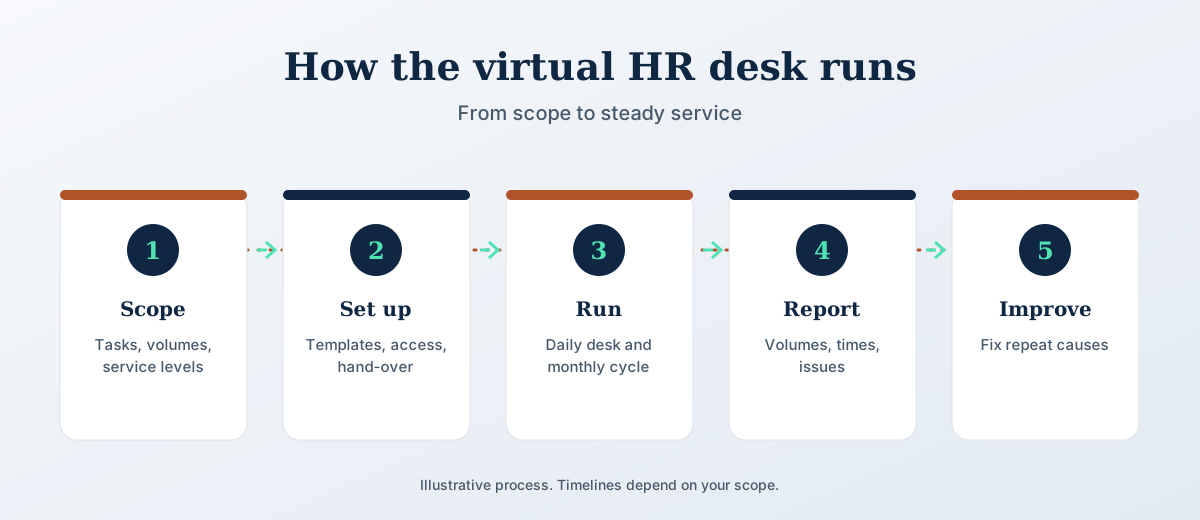
Five steps. The scope and timeline are agreed in writing before work starts.
The process in pictures
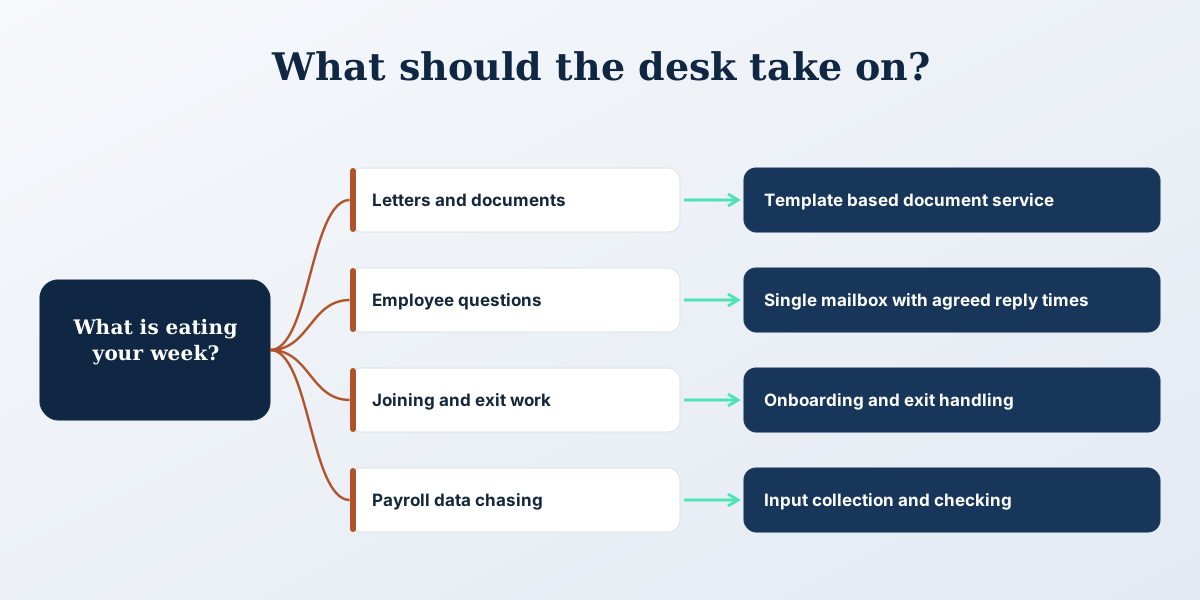
Three views of how this works: the steps, how to choose, and what to aim for.
Why it matters
Administration is where HR time disappears. A letter takes ten minutes, but fifty letters a month take a week. Queries interrupt deeper work. Records fall behind, and the gap shows up at the worst moment, an audit or a dispute. Moving the routine to a managed desk gives you predictable service and a record of every request. It also shows how much of the work comes from a few repeat causes, such as unclear leave rules, which can be fixed once.
What we need from you
- A list of the HR tasks done each month and roughly how many
- Your letter and document templates
- The tools in use: HRMS, payroll software, shared mailbox
- Names of the managers who approve requests
Not included
- Decisions on pay, promotion, hiring or discipline
- Legal opinions, which come from qualified counsel
- Statutory filings unless added to the scope in writing
Managed HR Operations and Virtual HR Desk FAQs
What is a virtual HR desk?
It is a shared team, run by HRBS, that handles routine HR requests for your employees and managers. Requests arrive by email, phone or your HRMS, and the desk answers them to agreed times.
Which tasks can you take over?
Onboarding, records, letters, payroll inputs, employee queries and exits are the usual scope. The exact list is agreed in writing before work starts, along with what stays with you.
Do we lose control of HR decisions?
No. The desk prepares information and carries out decisions you make. Pay, hiring, promotion and discipline remain yours.
How is employee data protected?
HRBS works under a confidentiality agreement with role based access. Data handling is described in the privacy policy, and you can ask for the controls in use before you decide.
Can the desk work in our HRMS?
Yes. HRBS can work inside your existing HRMS or payroll tool, or advise on a better fit if the tool causes the repeat work.
How is the service priced?
Pricing depends on scope and volume and is agreed in writing after a short call, starting with the free HR review.
Can the desk work in Hindi and English?
Languages are agreed during scoping. Tell us which languages your employees use, and the desk is set up to match before it goes live.
Can we start with one location?
Yes. Many employers start the service at one site, check the results for a few months, and then add other locations.
Which tasks to hand to the desk first
Do not move everything in one go. Start with work that is frequent, rule-based and easy to check.
A checklist before you sign
Go through these with any provider, including HRBS. If an answer is vague, fix it before work starts.
- The task list is written down, one line per task, with an owner for each.
- Every request type has a response time and a completion time.
- There is one point of contact for employees, and employees know it.
- Approvals are named: who signs off a letter, a leave exception, a payroll change.
- You can see the raw request log, not only a summary.
- Access to employee data is limited by role, and you know who holds it.
- Exit terms cover return of records and templates in a usable format.
What the first month looks like
The first weeks decide whether the desk works. A sensible order is below.
- Week one: agree the task list, collect templates, list the tools and approvers.
- Week two: check a sample of employee files against the documents you require, and list what is missing.
- Week three: run a small set of live requests, such as letters and leave queries, with your HR contact checking each one.
- Week four: review the log together, fix unclear rules, and decide which tasks to add next.
Desk, in-house assistant or HRMS self-service?
Three ways to remove routine work. They solve different problems, and they can sit side by side.
Who it does not suit
A virtual desk is the wrong fit if most of your HR work is on the shop floor and needs someone physically present, such as gate checks or live supervisor disputes. It also disappoints when the policies themselves are unclear. A desk applies rules faster; it cannot invent them. In that case start with the policy and process review, then add the desk.
Measures worth tracking each month
- Requests received, by type
- Share answered and closed within the agreed time
- Requests that came back for correction
- Repeat questions that point to an unclear rule
- Open items older than the agreed limit
For related work on payroll, see payroll outsourcing. To compare locations first, read about the multi-location HR operations audit.
Common questions
How is a virtual HR desk different from payroll outsourcing?
Payroll outsourcing processes salaries, statutory deductions and payslips each month. A virtual HR desk handles the wider routine work around it: joining paperwork, records, letters, employee queries and exits. The two connect at payroll inputs, so many employers use both under one agreed scope with shared contacts.
What should the written service levels cover?
They should list every request type, how fast it gets a first reply, and how fast it is completed. They should also say who approves exceptions, how missed targets are reported, and what happens when a target is missed repeatedly. Review them every month during the first quarter, then adjust.
Is a managed HR desk suitable for a company with one HR person?
Often yes. If that person spends most of the week on letters, data entry and routine queries, the desk takes that load and leaves time for hiring, employee relations and manager support. Agree clearly which tasks move, so the HR lead stays the decision maker and the desk stays on routine work.
What happens to our records if we stop using the desk?
Records stay yours. The agreement should say that files, templates and request logs are returned in a usable format, within a stated period, and that access is withdrawn. Ask for this clause before signing, and ask where your data sits while the service runs and who can open it.
Talk to HRBS about Managed HR Operations and Virtual HR Desk
Book a free HR review. It is a short call, and we tell you what to do first.
Book an HR review